๐Ÿ“Š Study Analytics

See Exactly How You Study.
Then Study Better.

Most students study hard without knowing where their time actually goes. StudyOS Analytics Dashboard turns study habits into clear data โ€” so you can optimise your effort and work towards high CBSE scores.

View My Analytics โ†’ See Dashboard Demo
12+
Analytics metrics tracked
Daily
Progress updates
PDF
Shareable reports
100%
Automatically generated
๐Ÿ“ธ Screenshot Placeholder โ€” Full Analytics Dashboard: Study Hours, Quiz Scores, Syllabus Progress
Recommended size: 1280ร—720px | File: analytics-dashboard-main.png

Sample Data View

Your Week at a Glance โ€” Real Numbers, Real Insights

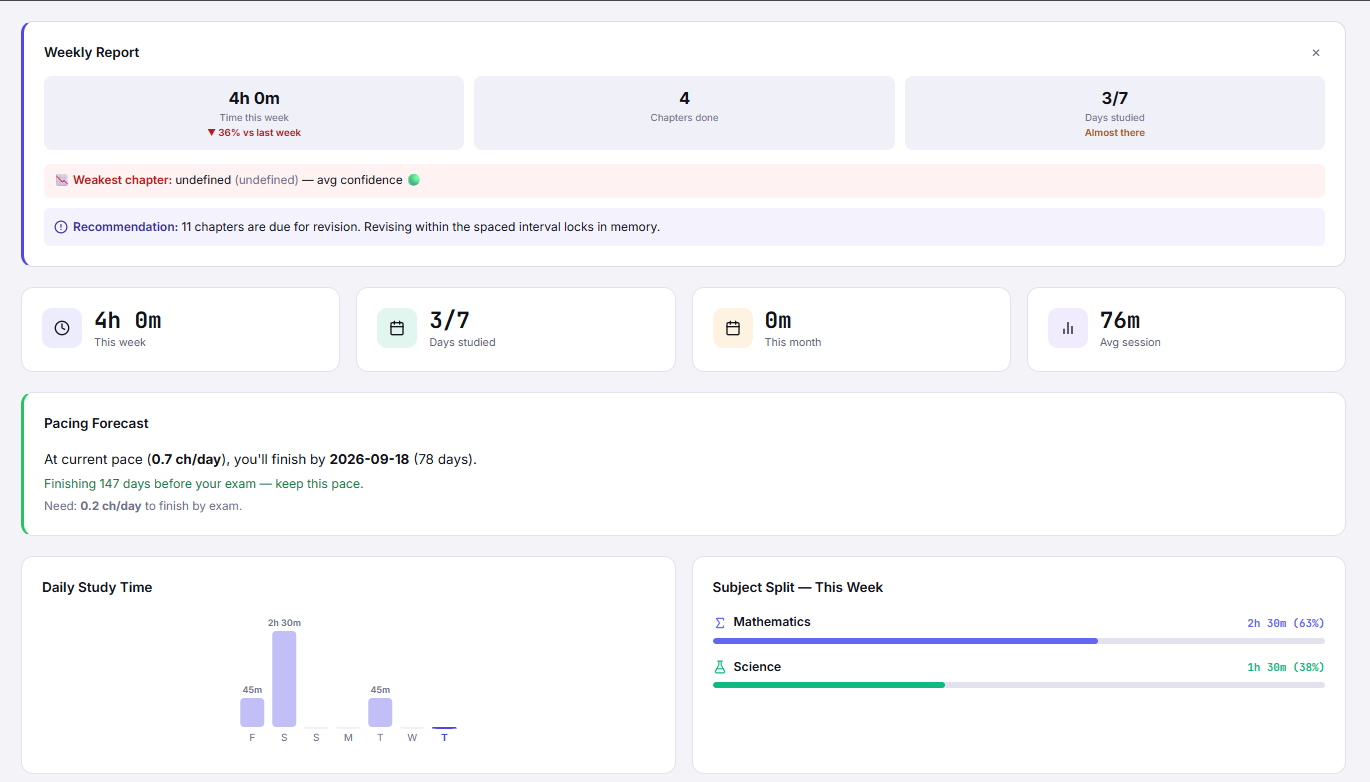
Here's what a sample StudyOS Analytics snapshot looks like for a Class 12 Science student:

38.5h
Total Study Hours This Week
โ†‘ +4.5h vs last week
78%
Average Quiz Accuracy
โ†‘ +6% vs last week
62%
Overall Syllabus Completion
โ†‘ On track for boards
14
Day Study Streak
๐Ÿ”ฅ Personal best!
23
Revision Sessions Done
5 due today

Time by Subject (This Week)

Dashboard Features

Every Study Metric You Actually Need

โฑ๏ธ

Subject-Wise Study Hours

See time distribution across all CBSE subjects. Spot the subjects you're avoiding and reallocate effort before it's too late.

๐Ÿ“ˆ

Quiz Performance Trends

Track accuracy improvement per chapter and subject over days, weeks, and months. Know exactly which chapters are getting stronger.

๐Ÿ—“๏ธ

Study Calendar Heatmap

A calendar heatmap of your daily study activity. Visually see your consistency and spot gaps before they become habits.

๐ŸŽฏ

Board Exam Readiness Score

A composite score combining syllabus completion, quiz accuracy, and revision coverage โ€” updated daily as you study.

๐Ÿง 

Peak Productivity Hours

Discover when you study most effectively. Schedule future sessions at your proven peak hours for maximum output.

๐Ÿ“ค

Shareable Weekly Report

Export or share a weekly summary with parents or teachers. Builds accountability and keeps everyone aligned.

๐Ÿ“ธ Screenshot Placeholder โ€” Weekly Report PDF + Subject Heatmap Calendar
Recommended size: 1280ร—720px | File: analytics-weekly-report.png

FAQ

Analytics Dashboard โ€” Your Questions Answered

What data does the StudyOS Analytics Dashboard show?

The dashboard shows total study hours by subject, daily and weekly study patterns, quiz accuracy trends, revision completion rates, syllabus progress percentages, streak history, and an overall board exam readiness score.

Can the analytics help me identify which subjects I'm neglecting?

Yes. StudyOS compares time spent across all subjects and flags imbalances โ€” for example, if you've logged 10 hours of Maths but only 2 hours of Chemistry over the same week.

How is study time tracked in StudyOS?

Study time is tracked automatically via the Focus Timer. Every time you start a focus session and link it to a subject/chapter, the time is logged. Manual entries are also possible.

Can I share my analytics report with my parents or teacher?

Yes. You can export a weekly or monthly analytics report as a PDF or shareable link. It shows study hours, quiz scores, and progress โ€” great for parent-teacher meetings.

Does the dashboard show me my best study times?

Yes. StudyOS analyses when during the day you complete the most sessions and perform best on quizzes, then suggests these as your peak study hours for scheduling future sessions.

You Can't Improve What You Don't Measure.

Start tracking your study data today and turn effort into actual exam results.

See My Analytics โ†’ Open Dashboard